10 things to put in your FMB RFP — most organisations forget half of them

Implementing the Federal Mobility Budget this year?
Launching an RFP this summer?
Here is the question most organisations forget to ask:
Are you buying a tool — or a full service that takes your worries away?
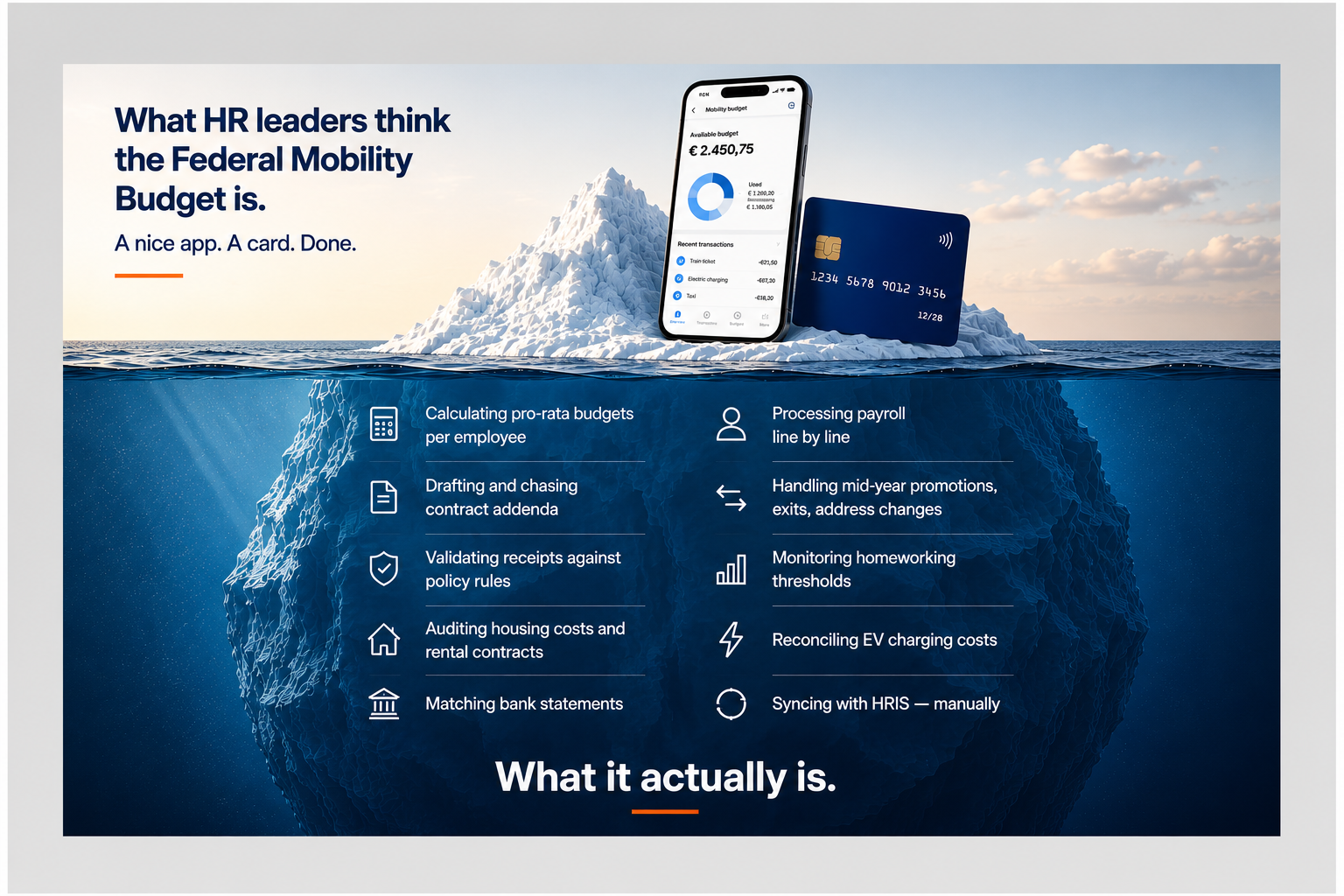
Because most providers will show you a catalogue. A nice app. Budgets. Payment methods. A few mobility modes.
What they won’t show you is how it actually runs.
Who validates the receipts? Who audits the housing contracts? Who generates the addenda? Who processes payroll? Who handles the exit when an employee leaves mid-year?
At 10 employees, you manage it manually and it’s fine. At 100+, someone in HR is doing that work every single month.
These are the 10 requirements your RFP should test — before you sign anything.
1. Does it auto-calculate budgets?
A Federal Mobility Budget is not a fixed number.
It needs to be pro-rated based on start and end date, adjusted for FTE percentage, and recalculated after promotions or role changes.
So ask your provider: Is budget calculation automated — or does HR verify it in a parallel Excel? Are home-work distances calculated automatically? Does the budget recalculate instantly when an employee’s situation changes? Is year-end settlement generated without a manual reconciliation run?
“Our platform calculates the budget” means nothing if someone is still checking the maths.
2. Is the contract addendum process automated?
Every employee who opts into the FMB needs a contract addendum.
With 10 employees, you draft them manually. With 150, you are continuously creating, sending, tracking and archiving documents — every time someone enrols or changes.
Ask your provider: Are addenda generated automatically at registration? Is eligibility enforced — so only qualifying employees can enrol? Is digital signing built in, with central archiving — without HR chasing anyone?
A platform that doesn’t automate addenda creates more paperwork than before.
3. Are receipts validated — and does your provider take responsibility for compliance?
This is one of the most important distinctions in the market.
Most platforms let employees upload receipts. Fewer actually validate them. And fewer still take responsibility for what gets approved.
The real question is not just whether the platform checks receipts. It’s whether your provider follows up on the rules of the law — and takes accountability for compliance.
Ask your provider: Is each receipt checked against policy rules in real time — automatically? Are out-of-policy expenses flagged before reimbursement, not after? Does the provider conduct random sample audits to catch what automation misses? Does your provider actively keep compliance checks running — and what happens when a rule changes? Can the platform handle more complex rules — like keeping professional trips outside the FMB budget, if your policy requires it?
Uploading a receipt is not validating it. And storing a receipt is not taking compliance responsibility. Ask your provider which one they actually do.
4. Does mobility data reach payroll without manual steps?
In many organisations, the payroll specialist receives a “ready” file that isn’t ready at all. They review it line by line. Manually correct entries. Add adjustments. Every month, the same anxiety: did something fall through?
Ask your provider: Does the platform export directly to your social secretary — SD Worx, Attentia, Securex, Partena, Acerta? Is the export create-only — protecting payroll integrity, with no overwrite risk? Can employees see what was reimbursed, when, and under which payroll code?
If your payroll specialist is manually reviewing mobility data each month — that’s not integration. That’s copy-paste.
5. Does it integrate with your HR systems?
Without HRIS integration, every new hire is a manual setup. Every address change is a manual update. Every exit is a manual close-out.
At 100+ employees, that is a full-time job.
Ask your provider: Are users provisioned automatically from your HRIS? Does the platform support SAP SuccessFactors, Workday, Oracle HCM — or offer an open API? When employee data changes in your HR system, does the mobility platform update automatically?
The real test of integration is not what the platform connects to. It’s what happens when data changes — and whether anyone has to do anything about it.
6. Can the provider audit housing costs end-to-end?
Housing reimbursement is where compliance exposure is highest. It requires rental contract verification, bank statement validation, distance checks, ceiling enforcement, and ongoing monitoring.
Most platforms let you upload documents. Fewer actually verify them.
Ask your provider: Is the rental contract validated automatically — or does HR open each PDF? Is the bank statement matched and checked — not just stored? Are distance limits and reimbursement ceilings enforced in real time?
And here is a scenario worth testing directly: suppose your policy only allows housing reimbursement when an employee works from home at least 50% of the time. Does your provider have the tools to monitor that — automatically? And if an employee falls below the threshold in a given month, are housing costs auto-blocked for that month?
That is what staying fully compliant actually looks like. Not a manual check after the fact — but a system that enforces the rule before the reimbursement goes out.
If housing validation depends on someone at HR opening a document — that is not a policy. That is a liability.
7. Does the provider offer full post-payment?
Many mobility platforms work with a pre-payment model. Meaning: finance needs to pre-fund a wallet. There is a cash flow impact. Reconciliation becomes more complex.
Ask your provider: Is billing fully post-paid — no upfront cash blocking required? Are housing costs and receipts reimbursed via payroll — with no separate payout flows? Is there any pre-funding, blocked account, or treasury reshuffling involved?
If your FMB provider requires prepayment — you are carrying their cash flow. Not running a policy.
8. Does the policy handle life changes automatically?
This is where policies either hold — or break.
A new employee joins. Someone moves house. Someone gets promoted. Someone leaves mid-year.
But here’s a scenario most providers can’t handle: an employee switches from a company car to FMB — mid-month, or even a few weeks ago. Are all their previous transactions automatically re-booked to the correct FMB budget? Or does someone at HR need to sort that out manually?
Ask your provider: Is onboarding triggered automatically from your HR system — or does HR set it up manually? When an employee enters FMB from a different role or ruleset, are prior transactions re-booked automatically? Does an address change trigger automatic re-evaluation of housing eligibility? When someone exits, does the platform settle the budget, recover overspend, cancel subscriptions, and close everything — automatically?
Every life event that requires a human to “update the system” is a future payroll error waiting to happen.
9. Can Pillar I costs be fully integrated?
Many organisations start FMB without Pillar I — and add it later. Others are already managing company cars and need full integration from day one.
Ask your provider: Can you start with manual contract uploads and automate when you’re ready to scale? Is EV charging data integrated — actual costs, not estimates? Are home and workplace charging points connected and settled in the platform? Are other car-related costs — like parking — included in the calculation?
Pillar I is often the most complex cost in FMB. If your platform cannot grow with it, you will be managing it manually forever.
10. Can your provider handle your full mobility policy — not just FMB?
The Federal Mobility Budget covers employees with a company car. But what about everyone else?
Most organisations have a much broader mobility reality: employees on public transport subscriptions, employees claiming a bike allowance, employees receiving a car allowance, employees on a cafeteria plan combining multiple modes.
Ask your provider: Can the platform manage commuting reimbursements for all employees — not just those in FMB? Does it support bike allowances, car allowances, and public transport subscriptions in a single system? Can employees without a company car access the same platform — with their own flexibility and budget?
The goal is not a separate tool for FMB. The goal is a single mobility policy that runs itself — for every employee, regardless of their setup.
If your provider can only manage FMB, you will end up with multiple systems, multiple exports, and multiple sources of error.
The real question behind all ten
Each of these questions tests the same thing:
Who is responsible for making your mobility policy work?
Is it the provider — through automation, validation, and integration?
Or is it your HR team — through monthly manual work, spreadsheet checks, and document handling?
A catalogue tells you what modes are supported. These ten questions tell you whether the policy will run itself — or run your team into the ground.
If your RFP doesn’t test these areas, you’re evaluating the catalogue. Not the operation.
RFP checklist — questions to include
Copy these into your RFP to get comparable, meaningful answers from every provider.
Budget calculation
- How are FMB budgets calculated? Is the calculation automated, or does it require manual input or verification?
- How are pro-rata budgets handled for employees who join or leave mid-year?
- How are budgets recalculated when an employee changes role, FTE percentage, or home address?
- How is year-end settlement handled?
Contract addenda
- How are contract addenda generated at employee registration? Is this automated?
- Does the platform enforce eligibility — preventing ineligible employees from enrolling?
- How is digital signing managed, and where are signed documents archived?
Receipt validation & compliance
- What happens after an employee uploads a receipt? Walk us through the validation process.
- Are out-of-policy expenses blocked automatically before reimbursement?
- Does the provider actively keep compliance checks running? What happens when legislation changes?
- Does the provider conduct sample audits? At what frequency, and who reviews them?
- Can the platform enforce complex policy rules — such as excluding professional trips from the FMB budget?
Housing costs
- How are rental contracts verified? Is this done automatically or by a human reviewer?
- How are bank statements validated?
- How are distance limits and reimbursement ceilings enforced?
- If our policy requires a minimum homeworking frequency (e.g. 50%) for housing eligibility, can the platform monitor this and automatically block housing costs for months where the threshold is not met?
Payroll integration
- Which social secretaries do you integrate with directly?
- Is the payroll export create-only, or can it overwrite existing payroll data?
- Can employees see their reimbursements and the corresponding payroll codes?
HRIS integration
- Which HR systems do you integrate with natively?
- What data is synced automatically — and what requires manual action?
- What happens when employee data changes in the HR system?
Post-payment
- Is your model post-paid or pre-paid?
- Is pre-funding of any kind required?
- How are housing costs and receipt reimbursements processed?
Lifecycle events
- When an employee enters FMB from a different role or ruleset, how are prior transactions handled?
- How are address changes processed — and does this trigger automatic re-evaluation of housing eligibility?
- Walk us through the full employee exit process: budget settlement, overspend recovery, subscription cancellation, documentation.
Pillar I — company car
- Can Pillar I costs be integrated? What is the process for uploading and syncing car contracts?
- Is EV charging data integrated? Which charging networks are supported?
- Are home and workplace charging costs separately tracked and settled?
Full mobility scope
- Does your platform manage mobility for all employees — not just those in FMB?
- Can it handle commuting reimbursements, bike allowances, car allowances, and public transport subscriptions?
- Is there a single platform for all employee types, or do different populations require different systems?
Vaigo is a mobility operations platform built for organisations running the Federal Mobility Budget at scale. More at vaigo.eu.